Cytus
- 4.6
- Rating
- 10.00M
- Installs
- Free
- Price

 Analysis by App-foxy
Some music games feel like reflex tests with a soundtrack attached. Cytus made a different first impression on me: it treats every note, line, and background image as part of one carefully controlled mood. I found myself paying attention not only to whether I was hitting notes, but also to how the screen moved, how the songs built tension, and how the visual style made each short session feel like a visit to a strange digital world.
That combination explains why this free music game from RAYARK has remained so visible for so long. It has an average rating of 4.6 from around 575 thousand ratings, and its audience has passed 10 million installs. Those figures do not automatically make a game right for everyone, but they do reflect something I noticed quickly: Cytus is easy to understand at the surface, yet it gives rhythm-game players enough precision and variety to keep returning.
The basic invitation is simple. You listen, watch the play area, and interact with notes as a scanning line reaches them. The challenge comes from timing, visual reading, and learning how each chart interprets the music. I would not describe it as a passive music player or a casual tapping toy. It asks for attention, but it also rewards players who enjoy gradually understanding a song rather than clearing everything immediately.
You May Also Like

 Pandora - Music & Podcasts
Pandora’s Music Is Easy to Start, but Harder to Recover
Pandora’s strength is its low-effort path from a seed to a station. Its weak spot is how much confidence it asks you to place in connection, setup, and quiet recovery.

 8 Ball Pool
 Is Built on Rivalries, Rematches, and Routine
A close look at the rivalries, rematches, shared routines, and unanswered safety questions that turn a quick pool match into a persistent mobile community.

 Samsung Music
’s Quiet Strength Is Playing What You Already Own
Its reach comes less from spectacle than from dependable access to a personal library. That simplicity is both the app’s strongest retention engine and its ceiling.

 AccuWeather: Weather Radar
AccuWeather Review: A Quick, Clear Forecast for Everyday Decisions
For everyday plans, the best forecast is the one you can understand quickly. AccuWeather makes rain timing, radar, and local conditions easy to act on, with a few trade-offs.

 Hill Climb Racing
Why Hill Climb Racing Still Turns Crashes Into One More Run
A tiny car, a bumpy hill and one more upgrade: Hill Climb Racing keeps resurfacing because its simple chaos makes every near-miss feel personal.

 AliExpress - Shopping App
AliExpress Makes Global Shopping Feel Personal, but Shoppers Bear the Risk
AliExpress turns a global marketplace into a pocket-sized discovery engine. Its reach is useful, its shopping loop compelling, and its trade-offs easy to miss.
More From Our News Desk
View All News


How the visual world turns songs into places
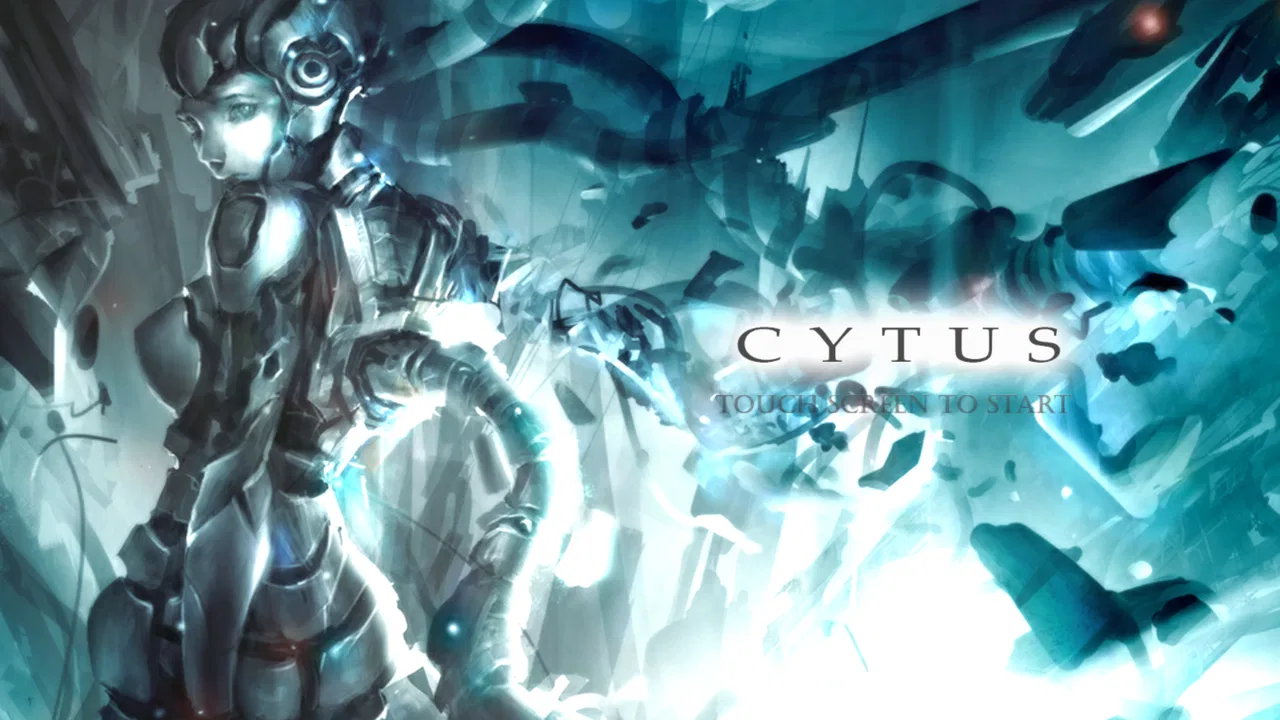
The setting is one of Cytus’s strongest qualities because it is communicated through style rather than long explanations. The game presents a futuristic, slightly melancholic identity, and its artwork gives the music a place to live. Menus, illustrations, chapter presentation, and chart screens feel connected, so moving from selection to play does not feel like leaving the game’s world behind.
I especially like the contrast between the clean interface and the more expressive illustrations. The play field needs to remain readable, so it uses strong lines and clear note shapes. Around that functional core, the art can become dramatic, abstract, colorful, or subdued depending on the song. This balance matters: the visuals create atmosphere without turning every chart into a cluttered animation.
There is also a useful emotional effect in the way the game frames its music. Instead of presenting tracks as isolated files in a list, Cytus makes them feel like parts of a larger collection. Even when I was only playing for a few minutes, the artwork encouraged me to browse further. That is a small but important design choice, because it gives the library a sense of discovery.
Players who mainly want bright, cheerful arcade presentation may find the tone more serious than expected. The futuristic mood can feel cool and distant rather than warm or playful. For me, that restraint is part of the appeal, but it also means the game is not trying to be a party game in the same way as a colorful multiplayer rhythm title. It is better suited to headphones, concentration, and a quiet moment.
A visual language that supports reading the chart
The art direction is not merely decoration. In a rhythm game, visual information has to arrive quickly, and Cytus generally makes the important elements distinct enough to follow. The scanning line gives the screen a predictable movement, while notes communicate when and where interaction is expected. Once I stopped looking at each note as a separate object and started reading the pattern as a phrase, the charts became much easier to understand.
That change in perspective is one of my most useful tips for new players. Do not stare only at the next note. Watch the whole area around the scanning line and anticipate clusters, holds, and changes in density. The game becomes less stressful when you treat the chart like visual sheet music. This is also where the artwork earns its place: the surrounding design creates mood, but the play elements remain the information that deserves priority.
Screen size makes a noticeable difference. On a larger phone or tablet, dense patterns are easier to read and rapid movements feel less cramped. A smaller display can still work, but I had to be more deliberate with finger placement. If you play with a case that makes edge touches awkward, removing it temporarily or changing your grip can make difficult charts feel fairer without changing your skill level.
Sound, pacing, and the feeling of a playable soundtrack
The music is the center of the experience, but Cytus does not use sound as a simple reward for tapping correctly. The charts are built around the character of each track, so the interaction often feels like following a song’s structure. A quiet opening may leave room for careful timing, while a busier passage can turn the same screen into a concentrated burst of movement.
I enjoy that the game encourages listening before chasing a perfect result. On a first attempt, I may focus on surviving and recognizing the song’s shape. On a later attempt, I notice where the rhythm changes or where a repeated pattern returns. This creates a natural pacing loop: discovery first, correction second, mastery later. It is more satisfying than a game that gives me every challenge at full intensity immediately.
The sound design also helps the visual world feel coherent. The futuristic presentation would be much less convincing if the music felt disconnected from it, but the overall selection supports the game’s electronic and atmospheric identity. There is enough rhythmic variety to keep the experience from becoming one long blur, while the consistent presentation makes the library feel curated rather than random.
One practical point is worth emphasizing: headphones improve the experience, especially when you are learning unfamiliar charts. They make small rhythmic details easier to distinguish and help separate the game’s timing from surrounding noise. I would not say headphones are mandatory, but playing through a weak speaker in a busy room makes precise timing harder and can make a good chart feel less responsive.
Why repeated attempts do not feel empty
Many music games rely on the desire to improve a score, and Cytus does that too, but its pacing gives retries a more musical purpose. A failed attempt often tells me something specific: I entered a dense section too quickly, misread a repeated shape, or lost the beat after a transition. Because the chart follows the song, improvement usually comes from understanding the passage rather than memorizing arbitrary obstacles.
My preferred routine is to play a new track once without worrying about perfection, then replay it while concentrating on the section that caused trouble. After that, I switch to another song instead of repeating the same chart endlessly. This keeps frustration under control and lets the soundtrack remain enjoyable. Players who treat every attempt as an exam may burn out sooner than players who treat each run as a listening and reading exercise.
The pacing can still be demanding. If you are unfamiliar with rhythm games, the screen may appear calm one moment and suddenly become crowded. That is not necessarily poor design; it is part of the genre’s learning curve. Still, Cytus is less comfortable for someone who wants a completely relaxed game that can be played without concentration. Its mood is calm, but its input demands are not always calm.
Where the mechanics fit the music—and where they do not
The central mechanic is approachable because the scanning line gives you a clear timing reference. You do not need to learn a complicated control scheme before playing. The challenge lies in reading timing, position, and note behavior together. That makes the game suitable for short sessions, yet deep enough for players who want to improve accuracy over time.
I think Cytus works best when the chart mirrors the song instead of fighting it. A good pattern feels like a visual interpretation of the beat, melody, or accent. When that connection is strong, successful play feels expressive. I am not simply pressing at the correct moment; I am responding to the track’s structure. That is the point where the game becomes more than a collection of timed inputs.
There is a trade-off, though. Visual rhythm games can be tiring when charts become dense, particularly on a phone held in one hand. Rapid taps may encourage awkward grip changes, and extended sessions can become physically uncomfortable even when the music remains engaging. I recommend resting your hands and changing posture rather than assuming every miss means you need more practice.
Another useful habit is to adjust your expectations between songs. A chart that looks easy because it has few notes may still demand careful timing, while a busy chart may become manageable once its repeating pattern is recognized. I found that judging difficulty only by visual density led me to choose poorly. Listening to the song first gave me a better idea of whether I was ready for its pacing.
Who will enjoy the learning curve
Cytus is a strong fit for players who enjoy electronic music, stylized science-fiction presentation, and games where improvement comes through repetition. It also suits people who want a focused activity during a commute, a break, or a quiet evening. A realistic everyday use is a short session after work: I can play one or two tracks, identify a section to improve, and stop without needing a long story checkpoint or a team waiting for me.
It is less suitable for someone seeking a social rhythm game built around direct competition or shared play. It is also not the best choice if you want a music game that uses only familiar mainstream songs. Cytus’s identity depends on its own musical and visual world, so players who prefer a personal playlist or recognizable commercial tracks may be happier with a different kind of rhythm app.
Compared with a traditional piano-style rhythm game, Cytus feels less like following falling columns and more like interpreting movement across a designed space. Compared with a simple tap-to-the-beat game, it demands more visual planning and gives the player more to learn. That middle ground is its advantage: it has a lower entry barrier than a highly technical arcade simulator, but more personality and precision than a disposable tapping game.
The free entry point is helpful because I could understand the timing and atmosphere before deciding whether I wanted to spend anything. The game includes in-app purchases ranging from $0.99 to $129.99 per item, so anyone who dislikes optional spending should check purchase prompts carefully and set device restrictions if necessary. I would approach the paid content as an expansion of an experience I already enjoy, not as something to buy automatically at the start.
Practical details before installing
On Android, the game requires version 5.0 or later, which makes it accessible to a broad range of devices. The current version is 10.1.8, and the app is rated Teen. That age guidance is worth taking seriously for families, not because the game is difficult to understand, but because the tone and content presentation are aimed at older children and above rather than very young players.
The game is free to install, which makes trying it straightforward. I would still recommend checking available storage and using a stable connection during setup, especially if your device is older or nearly full. Once playing, the more important preparation is practical: use a comfortable grip, keep the screen clean, and avoid playing difficult charts while walking or multitasking.
New players should begin by learning the scanning line rather than immediately chasing high scores. Let it become a steady visual metronome. Tap slightly ahead of panic, keep your eyes moving across the chart, and replay a song only after you understand why a section went wrong. If your timing feels inconsistent, test whether the problem is the chart, your grip, or environmental distraction before blaming yourself.
For experienced rhythm-game players, the more interesting question is not whether the controls are original in isolation, but whether the presentation makes them feel meaningful. In my experience, the answer is yes when the music, artwork, and chart design align. The game’s best moments come from that alignment, while its weaker moments are the ones where visual busyness or unfamiliar pacing makes the chart feel like an obstacle rather than a musical phrase.
My verdict on the atmosphere and the long-term appeal
After spending time with Cytus, I see it as a music game with a remarkably consistent personality. RAYARK gives the interface, illustrations, soundtrack, and timing system a shared direction, so the game feels like one world instead of separate menus wrapped around unrelated songs. That coherence is the main reason I would recommend it to a friend who wants a rhythm game with mood as well as mechanics.
Its limitations are real. Precise play can be uncomfortable on small screens, dense charts take concentration, and the futuristic tone will not appeal to everyone. The free structure also deserves attention because optional purchases can become expensive at the upper end of the listed range. Players looking for multiplayer competition, a personal music library, or a completely casual experience should choose another option.
For me, the strongest use case is a focused solo session with headphones, when I want something more active than listening to music but less demanding than a full action game. I can enter for a few minutes, follow a song’s rhythm, and leave with a clear sense of progress. That is a good sign of thoughtful pacing: the game respects short sessions without making longer practice feel pointless.
My recommendation is simple: try Cytus if you want art, sound, and timing to create one playable atmosphere. Give it time to teach you how to read its charts, and do not judge it only by the first difficult song. It is free to begin, widely played, and still distinctive enough to stand apart from ordinary tapping games. I would skip it only if your priority is social play, familiar pop music, or effortless background entertainment.
FAQs for Cytus
01What is Cytus, and what kind of game is it?
Cytus is a rhythm game for Android and iOS in which you tap, hold, and slide notes in time with music. It combines fast-paced gameplay with a stylish visual presentation and a story told through songs, character scenes, and unlockable content. The difficulty varies considerably, so it can appeal to casual players as well as experienced rhythm-game fans.
02Is Cytus free to download, and does it include in-app purchases?
Cytus can generally be downloaded for free, but the available content and monetization may depend on the version and platform. Some songs, chapters, or additional features may require in-app purchases, while advertisements or other limitations can apply to free users. Before downloading, it is worth checking the current store listing to confirm pricing, included content, and purchase requirements.
03Does Cytus require an internet connection to play?
Many parts of Cytus can be played offline after the necessary game data and songs have been downloaded, which makes it suitable for travel or areas with limited connectivity. However, an internet connection may still be needed for the initial installation, updates, account-related functions, advertisements, or downloading additional content. Offline availability can vary depending on the version and device.
04Is Cytus suitable for beginners, or is it too difficult?
Cytus is accessible to beginners because it offers songs with different difficulty levels and teaches the basic timing mechanics through straightforward note patterns. That said, the game becomes demanding quickly, especially on higher levels where notes move faster and combinations require precise reactions. New players should start with easier tracks, adjust the timing settings if necessary, and progress gradually.
05What devices are compatible with Cytus, and does it take up much storage?
Cytus is available for compatible Android and iOS devices, but the exact requirements can change as the game is updated. Because it includes music, artwork, story content, and downloadable song data, the final storage space may be noticeably larger than the initial download size. Check the Google Play Store or App Store listing for current compatibility details and keep extra free space available for updates.
Pros
- Beautiful hand-drawn artwork and polished visual presentation.
- Large song library spanning multiple genres and moods.
- Simple tap-based controls are easy to learn but hard to master.
- Story elements add extra context and motivation beyond rhythm gameplay.
- Offline play makes it convenient for gaming without an internet connection.
Cons
- Some songs and chapters may require additional purchases to unlock.
- Timing can feel strict
- especially on faster tracks and higher difficulties.
- The amount of content may feel overwhelming for new rhythm-game players.
- Long sessions can become repetitive if you prefer more varied gameplay.
- Performance and loading times may vary on older phones or tablets.

Cytus
Gallery